Menu openen
Menu sluiten
Connected supplier

Solo Midocean product configurator and artwork automation

Solo Midocean (Mid Ocean Brands) is a leading European promotional product supplier offering a vast catalog of corporate gifts, drinkware, and branded merchandise.

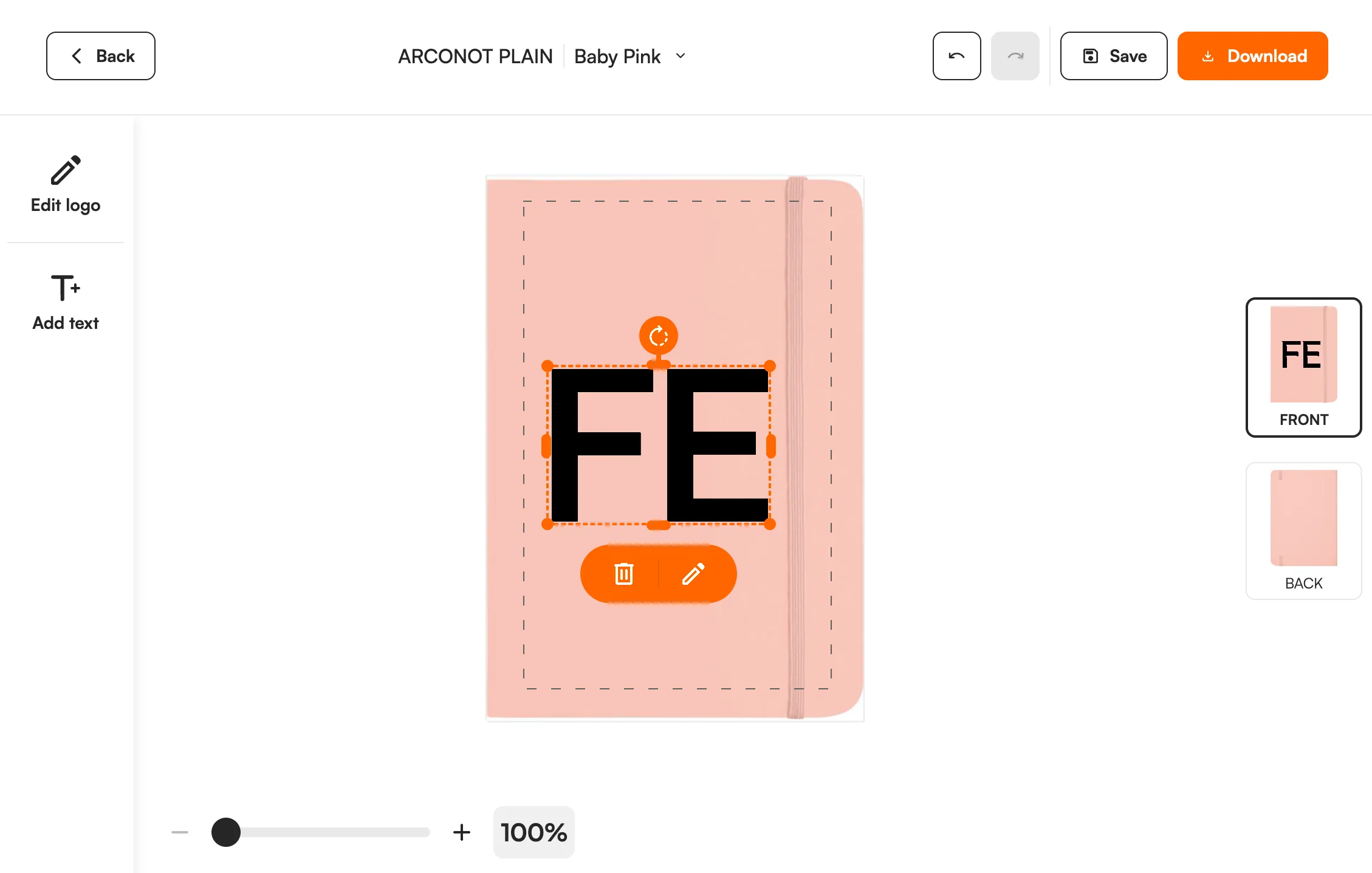
Solo Midocean product with a customer logo in the FastEditor editor
2538
Products
Netherlands
Headquarters
Daily
Catalogue sync
Direct API
Integration
Onboarded
Status

In short

2,538 Solo Midocean products are live in the FastEditor Product Hub, each with its print areas and eight decoration methods mapped. Put the Logo Editor on your webshop or use the Studio Tool for quotes, and every order comes with a proof and a print-ready file.

Overview

Solo midocean, part of Mid Ocean Brands, is one of Europe's largest promotional product suppliers, with a catalogue spanning drinkware, bags, writing instruments, technology, textiles and lifestyle gifts. For a reseller, that scale is both the attraction and the problem: thousands of products, each with its own print areas, decoration methods and file requirements, is more than any DTP team can hold in their heads.

Solo midocean products are live in FastEditor's Product Hub, with decoration methods and print areas attached to each product. FastEditor prepares customer artwork using the selected product’s configured print area, decoration technique and supplier requirements. Raster logos are vectorized when the technique requires vector output. The editor applies automatic improvements and guides customers through any artwork issues. After the customer places an order, the webshop’s Sale Notification triggers the configured production file and proof, without a separate manual prepress step.

How the integration works

The Solo midocean connection keeps product data, images and decoration specifications in sync, so a range that Solo midocean changes or discontinues is reflected in your store without anyone touching a spreadsheet.

Three things travel with every product:

  • Print areas. The position, size and shape of each decorable area, so the editor holds a customer's design to what the product can physically take.
  • Decoration methods. Which techniques are available on that specific product, each carrying its own limits on colour count, line weight and resolution.
  • Product data and images. Variants, colours and imagery, so a logo previews on the product the customer is actually ordering.

Browse Solo Midocean products in Product Hub

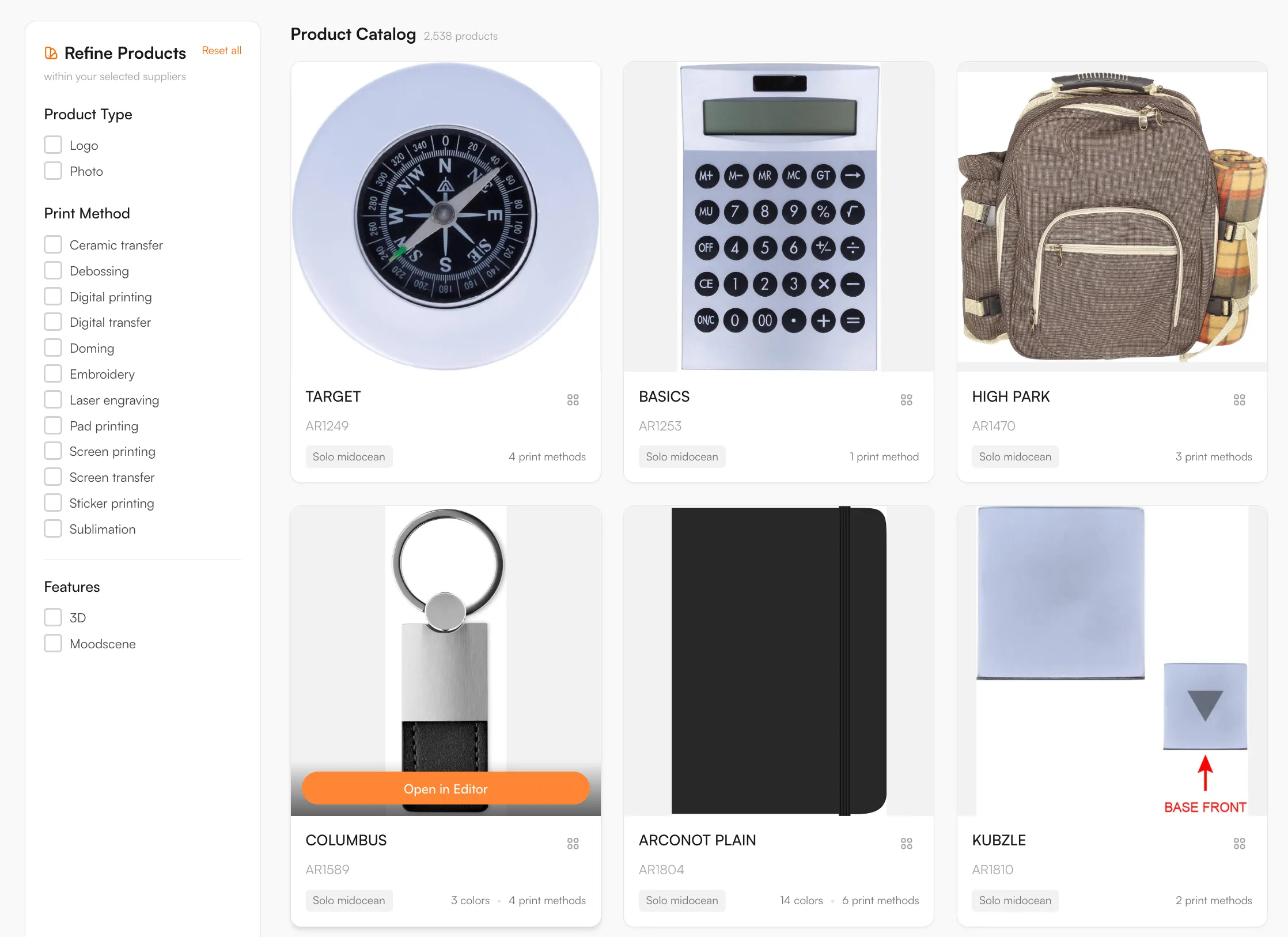
Every product, with print positions and decoration methods attached, ready to drop into your webshop.

Solo Midocean catalogue in the FastEditor Product Hub

Example products

Decoration methods

Pad printing, Screen printing, Laser engraving, Digital printing, Embroidery, Doming, Sublimation, Transfer

Artwork requirements

Across a catalogue this size, artwork rules vary product by product, and FastEditor validates against them before a production file is generated. The checks that run on each upload:

  • Line thickness. FastEditor provides an indication to help the user assess fine detail against the selected product and decoration technique’s requirements. Thin lines are not automatically corrected. Follow the supplier’s requirement for that configuration rather than a single minimum for every product.
  • Colour limits. Screen and pad printing carry a maximum number of spot colours per position, so an over-colour logo is stopped before it ships.
  • Resolution and DPI. Raster uploads are measured against the actual output size for the chosen product and method.
  • File formats. Customers upload JPG, PNG, PDF, AI or EPS. Raster logos are vectorized when the selected decoration technique requires vector output; when it does not, FastEditor may recommend vectorization and the user can choose whether to apply it.
  • Colour schema. Uploads convert to the colour space the method requires, with spot-colour matching where the method supports it.

What the print proof looks like

Selling Solo Midocean products online: what to know

What the range covers

2,538 Solo Midocean products are in the Product Hub, across drinkware, bags, writing instruments, technology, textiles and lifestyle gifts. Solo Midocean lists many items by model name, such as TARGET, NOTELUX and REGAL, and the Product Hub shows them the same way, so they match the supplier's own references. The catalogue updates daily.

Decoration methods and artwork

Eight methods are mapped: pad printing, screen printing, laser engraving, digital printing, embroidery, doming, sublimation and transfer. Pad printing is the usual choice for small hard items such as pens, with a small print area and a limited number of spot colours. Digital printing and sublimation allow full colour. Laser engraving gives a single tone. The editor shows only the methods that the chosen product supports and checks the logo against that method. For embroidery, FastEditor prepares and checks the artwork today. Embroidery file (DST) output is in testing and not yet available.

How resellers use it

With a catalogue this size, the time goes into checking artwork per product. FastEditor places the logo inside the real print area and flags problems such as too many colours or low resolution before the order is placed. Use the Logo Editor on your webshop in Shopify, WooCommerce or through the API, or the Studio Tool for quotes. Each order gives you a proof and a production file.

Browse Solo Midocean products in the Product Hub

What Solo Midocean publishes about its print techniques

These are Solo Midocean's own statements about its print service, read on its website in November 2026. They are not FastEditor limits. The checks the FastEditor editor runs are listed under artwork requirements on this page.

  • Number of techniques 17 printing techniques, printed in its own facility in Poland.
  • Pad printing Pantone (PMS) colours only, no gradients, up to 4 colours.
  • Screen printing Pantone (PMS) colours only, no gradients. A 360 version exists for cylindrical items.
  • Screen transfer Up to 8 PMS colours. Needs a flat print surface.
  • Digital printing CMYK based colours and white. Exact Pantone matching cannot be guaranteed.
  • Digital transfer Full colour (CMYK plus white). Needs a flat print surface.
  • Sublimation Full colour (CMYK). Only white items or surfaces.
  • Laser engraving No ink. CO2 and fibre lasers for different materials. A 360 version exists for cylindrical items.
  • Embroidery Threads are matched to Pantone (PMS) colours.
  • Doming Full colour (CMYK).
  • Debossing Limited number of colours, no Pantone colours. Foil print possible.

Source: Solo Midocean, printing and personalisation. Solo Midocean can change these figures, so check with the supplier before you quote them.

How to start selling

  1. Start with the Solo midocean catalogue. The range is live in the FastEditor Product Hub with print areas and methods already attached to each product.
  2. Choose how customers experience it. Embed the Logo Editor on your webshop, or work in the Studio Tool for internal quotes.
  3. Design, preview and validate in one place. The logo sits inside the real print area and is checked against the product's colour and line rules before approval.
  4. Generate the proof and production file. In Studio Tool, use Download to generate the files for the selected product and decoration technique. In Logo Editor, the webshop sends a Sale Notification after the customer places the order to trigger file generation. The proof and production file follow the selected supplier configuration.
Book a demoTry Studio free

Logo Editor or Studio Tool?

Two tools, one artwork engine.

Studio Tool

For internal sales & account management teams

✓Browse the Product Hub and pick the product
✓Design it across positions, then download the branded print proof
✓Get production-ready files, no customer order needed
Explore Studio Tool →

Logo Editor

For your webshop

✓Connect to your webshop, linked to the right product by SKU
✓Your customer designs and approves online
✓After the order, you receive the production-ready files
Explore Logo Editor →

Frequently asked questions

How many Solo midocean products are available through FastEditor?

The Solo midocean catalogue is available through the FastEditor Product Hub, with print areas and decoration methods attached to each product, so availability and specifications stay current.

Which Solo midocean decoration methods does FastEditor support?

Pad printing, screen printing, laser engraving, digital printing, embroidery, doming, sublimation and transfer, matched to each product. Each product carries the methods available for it, with the colour and line-weight limits that method imposes.

Do Solo midocean orders produce a print-ready file automatically?

Yes. FastEditor generates a proof and a production file using the selected product and decoration technique’s configured supplier specifications. Raster logos are vectorized automatically when vector output is required; otherwise vectorization may be recommended and is optional. In Studio Tool, generate the files with Download. In Logo Editor, the webshop sends a Sale Notification after the customer places the order to trigger file generation. The production format depends on the configuration and can be JPG, PNG, PDF or SVG. Embroidery DST output is currently in testing and is not yet available.

Does FastEditor keep the Solo midocean catalogue up to date?

Yes. Product data, images and decoration specifications sync automatically, so changes across the Solo midocean range are reflected in your store without manual updates.